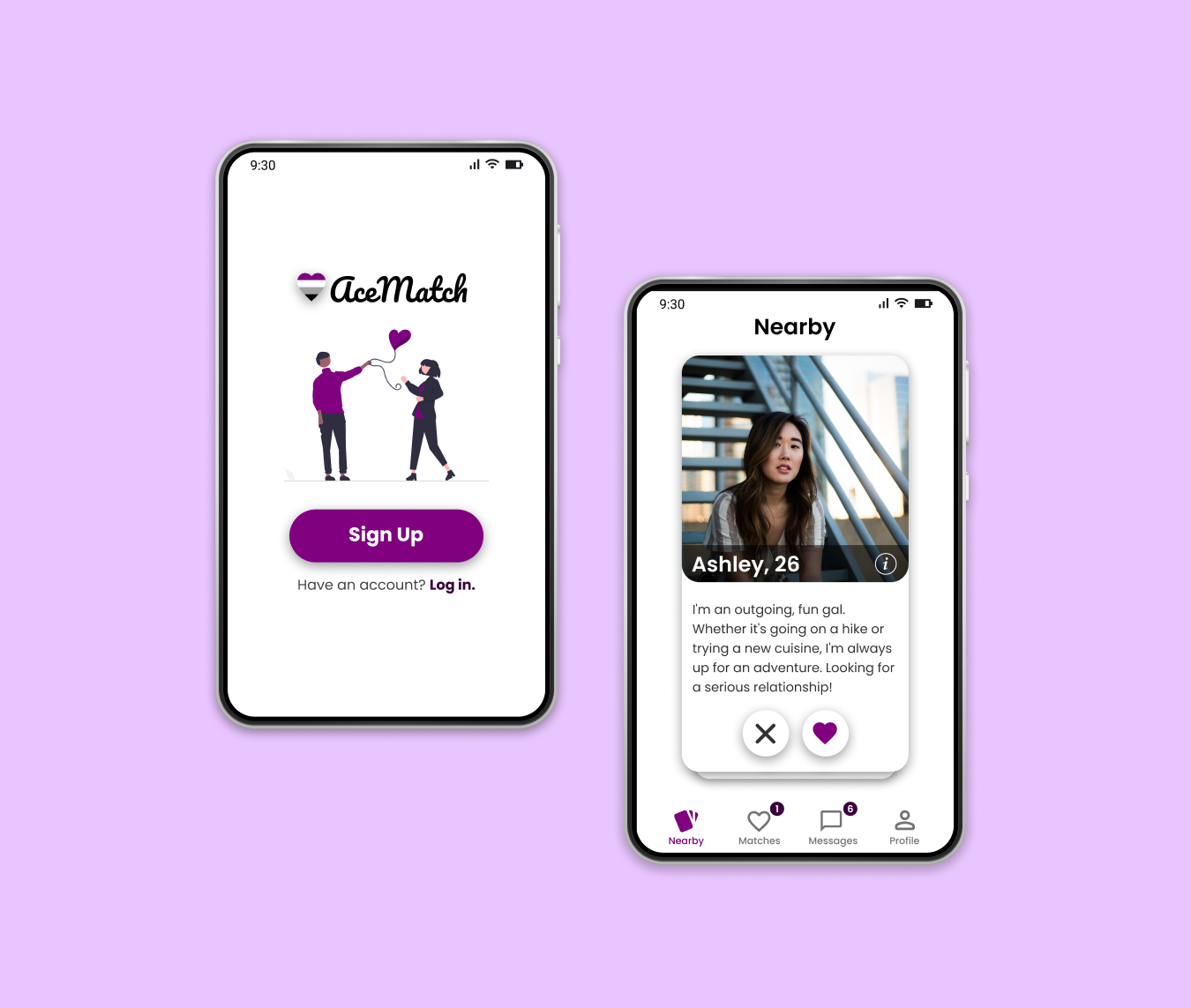
AceMatch
Helping Aces Create Genuine Connections
I was first introduced to asexuality through the Netflix animated series BoJack Horseman. One of my favorite characters, Todd Chavez, is asexual and struggles to find a compatible partner. Eventually, his best friend and high school ex-girlfriend, Emily, develops an ace dating app called All About That Ace. This app ultimately helps Todd find his current girlfriend, Maude.
After watching this show, I was opened to the dating struggles that asexual people face. I wondered why I hadn’t heard of asexual dating apps before; it seemed like a simple solution to help aces navigate love in a sex-focused world.
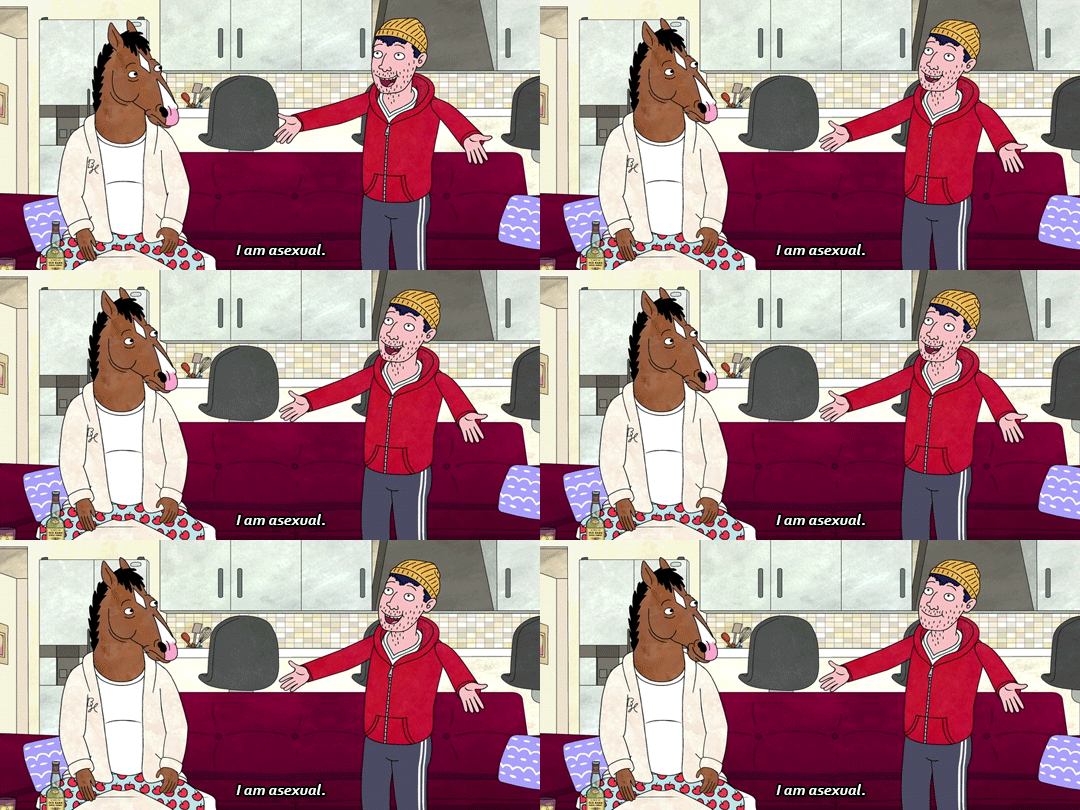
BoJack Horseman’s Todd Chavez coming out as asexual.
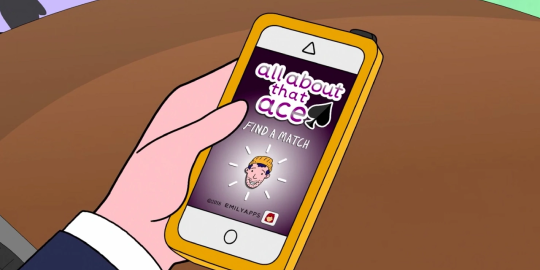
An asexual dating app from the show called All About That Ace.
Overview
As the sole UX designer, I developed AceMatch while working on my coursework for Google’s UX Design Certificate. I conducted user research, created the visual and interaction design using Figma, and prototyped and tested it.
This project took approximately three months from December 2022 to February 2023. Although the high-fidelity prototype is finished, this passion project is far from completion and I hope to eventually code a working product to test with real users.
Problem
Asexual people experience little to no sexual attraction. However, many people in this community still experience other forms of attraction and desire emotionally intimate relationships.
For many aces, dating apps are a way to find potential friends or partners. Unfortunately, hookup culture is deeply ingrained in most dating apps, making it difficult to form meaningful relationships.
Solution
Design an asexual dating app to help users easily find a compatible partner.
User Survey
To gain insight into the thoughts and feelings of asexual users on traditional dating apps, I created a qualitative user survey using Google Forms to inquire about their experiences. I collected a total of 167 user surveys from various asexual communities on Reddit.
This is what ace users had to say about traditional dating apps:
“I don’t like that I can’t find people who are lower end of the sexuality spectrum like asexuals.”
“In general, I don’t feel attracted to people until I get to know them, so photo-based matching is kind of pointless for me.”
“If I disclose that I am demisexual, I get all kinds of invasive questions.”
Here are the key findings from the survey:
Insight #1: Users struggled finding a partner who had similar attitudes about sex.
Insight #2: Users found dating profiles are not descriptive enough to get to know people before matching.
Insight #3: Users stated that disclosing their asexuality on dating platforms would lead to negative reactions from other users.
Competitive Audit
I conducted a competitive audit to gain a better understanding of the current dating app market. All of the competitors chosen offered either web or mobile dating apps specifically for ace or broader LGBTQ+ users.
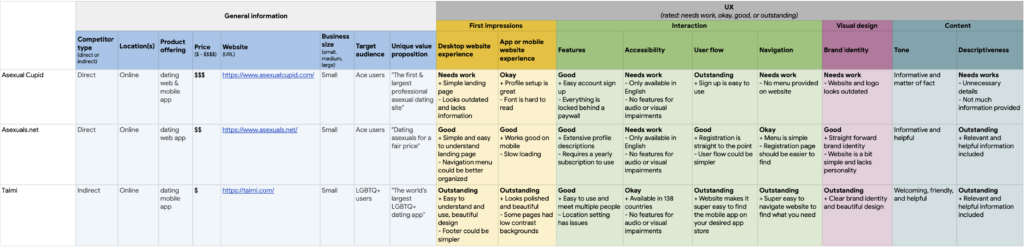
Competitive audit spreadsheet of two direct competitors, Asexual Cupid and Asexuals.net, and an indirect competitor, Taimi.
Here’s what I learned:
Key Finding #1: As of February 2023, there is currently only one ace-specific dating app on the mobile app market, Asexual Cupid.
Key Finding #2: Taimi offers a polished dating app for all LGBTQ+ users; however, it does not provide meaningful features for users seeking non-sexual relationships.
Key Finding #3: Asexual Cupid and Asexuals.net offer a simple dating solution for ace users, but important features are hidden behind a paywalls or subscriptions. Additionally, these businesses lack clear branding and have outdated-looking web or mobile apps.
User Personas & Journey Map
As someone who is not part of my main user group, it was important for me to prioritize design decisions specifically for asexual users. To help me build a user-focused product that addressed asexual people’s needs and wants, I created a persona for my primary user based on survey insights.
Using this persona, I constructed a user journey map to better understand the experiences of an asexual person navigating a traditional dating app. This helped me brainstorm opportunities and improvements my dating app could address, and focus on the most important design decisions.
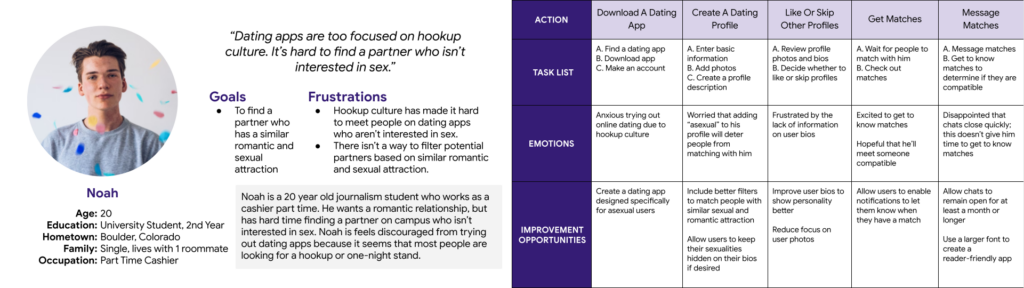
Persona of my main user group (left). User journey map (right).
User Flow
As this project was quite large, it was important for me to understand the structure of the app before designing. To create an intuitive experience, I used user flows to visualize how users could interact with my app to prevent any unnecessary steps.
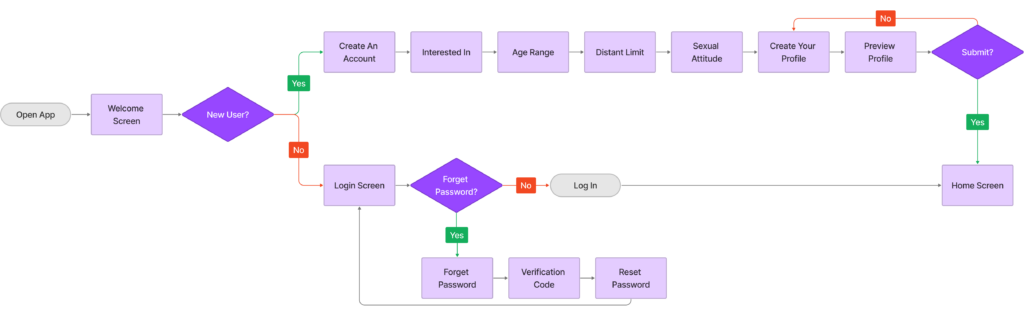
User flow for signing up as a new user.

User flow outlining how a user might interact with a dating app, from swiping to chatting with a match.

User flow for editing a user profile.
Sketches
I used Procreate to sketch initial wireframes, which allowed me to quickly explore and iterate on multiple screen layouts before deciding on the final UI.
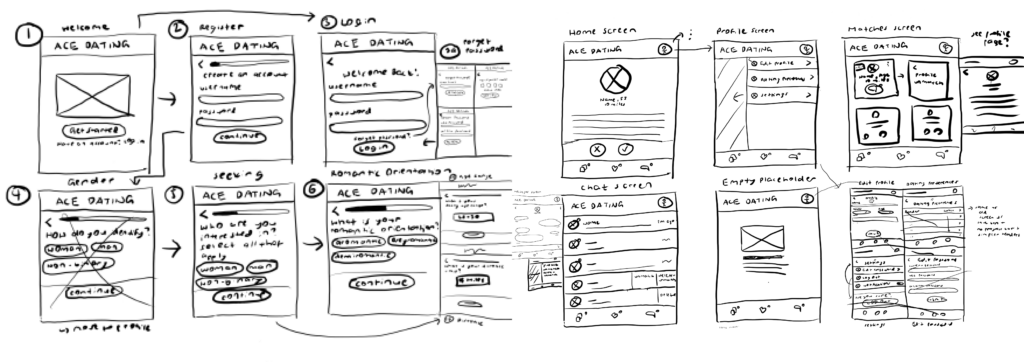
Some early designs of AceMatch.
Digital Wireframes & Low Fidelity Prototype
I used Figma to turn my sketches into digital wireframes and then created a low-fidelity prototype to test my early designs with real users remotely.
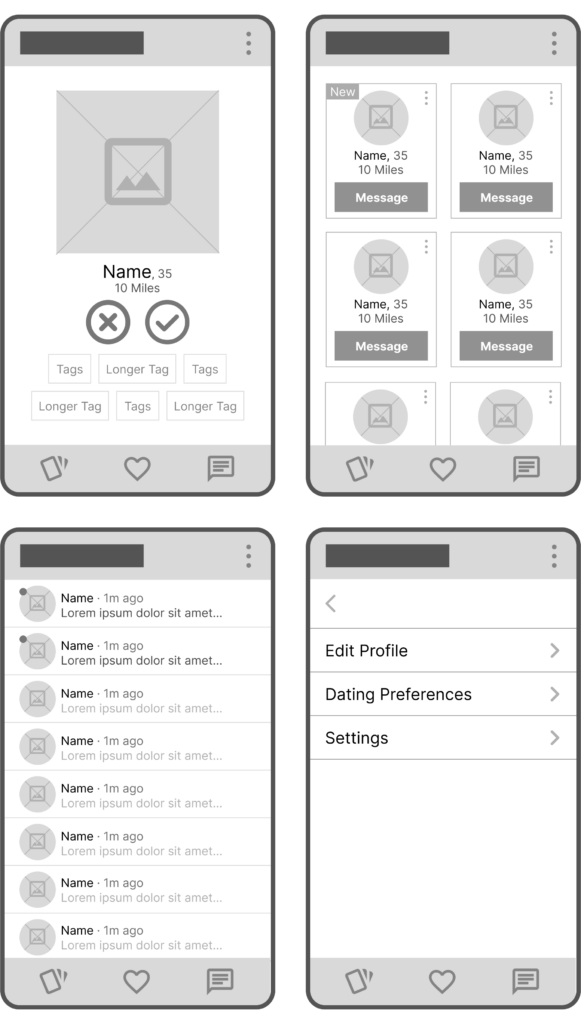
Digital wireframes of the main screens from AceMatch.
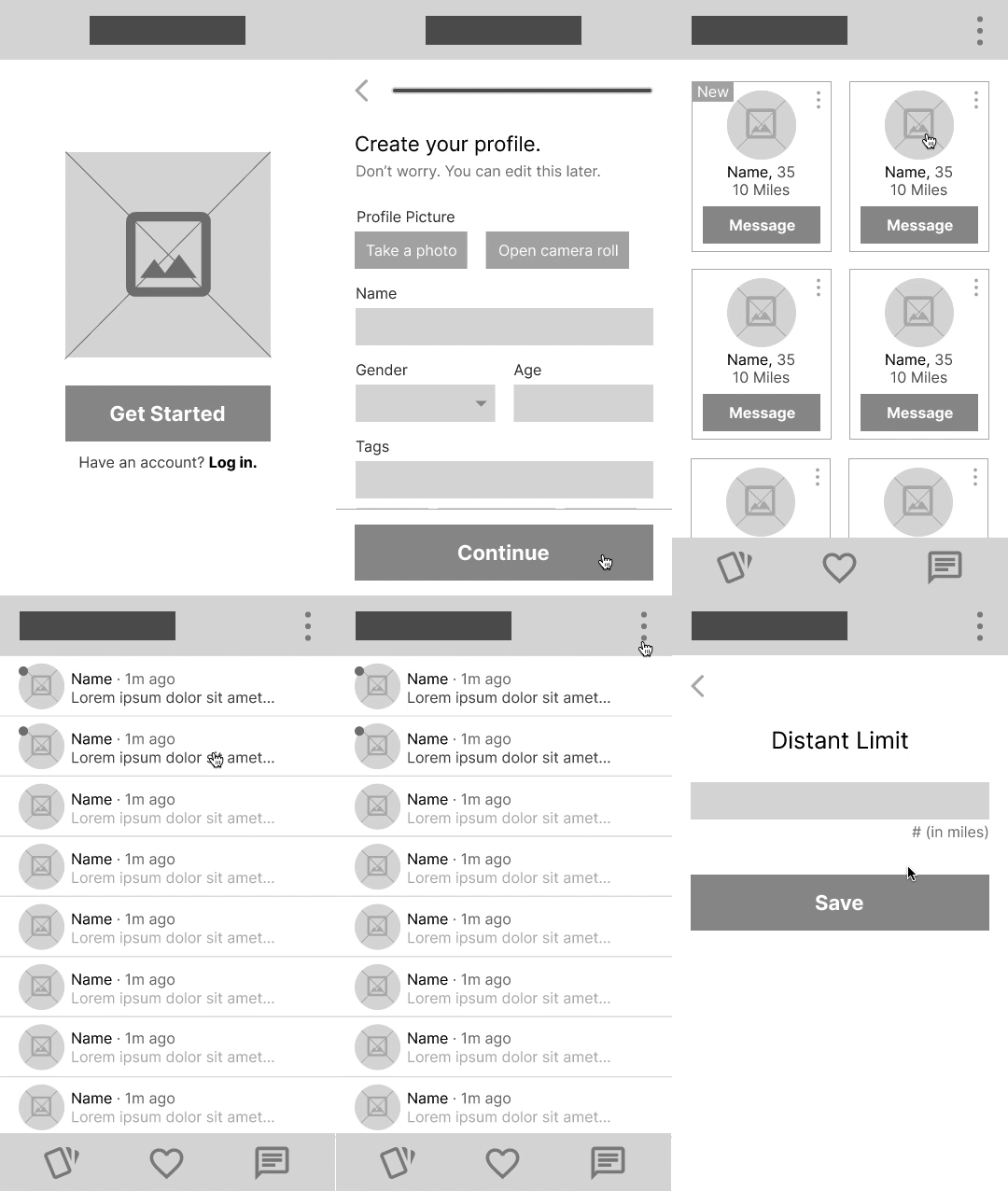
Low fidelity prototype used for user testing.
Usability Studies
To understand how users interact with my app and identify areas for improvement, I conducted two remote, moderated usability studies via Zoom.
I used affinity diagrams to identify patterns in the user feedback. This helped me develop actionable insights to improve the user experience.
The findings from the first study guided the design process, from digital wireframes to mockups. The second study used a high-fidelity prototype to reveal which aspects of the mockups needed refining.
Here’s the average task completion rate after two studies:
Usability Study #1: 85%
Usability Study #2: 100%
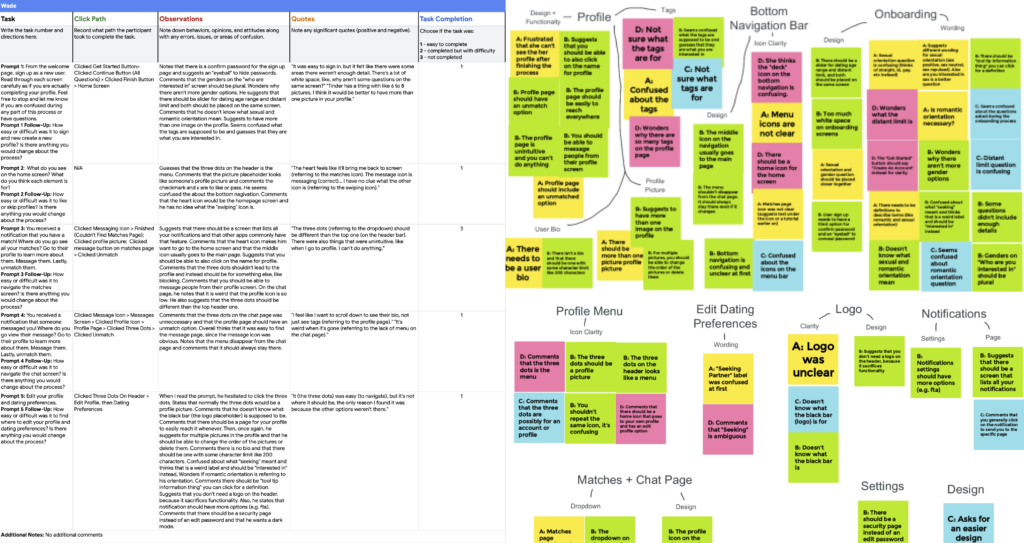
Spreadsheet of usability study notes (left). Affinity diagram (right).
Key findings from usability study #1 (low-fidelity prototype):
Insight #1: Users need clear icons for the profile menu and the bottom navigation bar.
Insight #2: Users need questions that are easy to understand.
Insight #3: Users desire a functional profile page.
Key findings from usability study #2 (high-fidelity prototype):
Insight #1: First-time users need help finding the profile page.
Insight #2: Users desire a feature to report inappropriate behavior.
Final Designs
User research revealed that disclosing asexuality on dating platforms can lead to negative reactions. After the competitive analysis, I saw an opportunity to create an asexual-specific mobile dating app to provide a safe environment for asexuals to find companionship.
User Experience #1: Welcome Screen
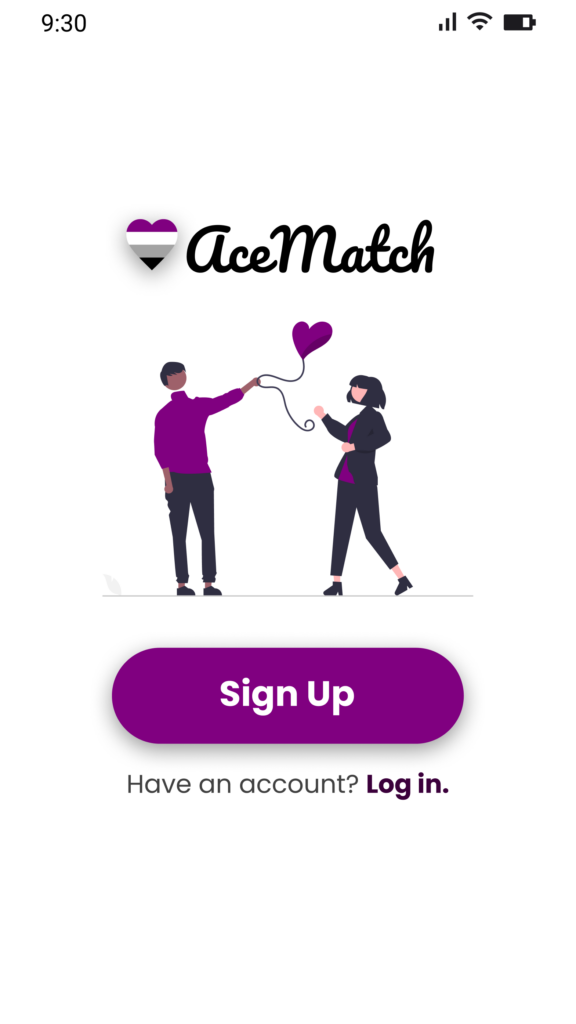
Welcome Screen
The competitive analysis revealed that existing asexual dating apps lacked modern design and branding. To stand out from the competition, I designed an app with an engaging user interface and attractive visuals. In the Welcome Screen, I used friendly cover art and Ace flag colors to create a warm and welcoming atmosphere.
After user testing, the “Get Started” button was changed to “Sign Up” to make the text clearer.
User Experience #2: Onboarding Screens
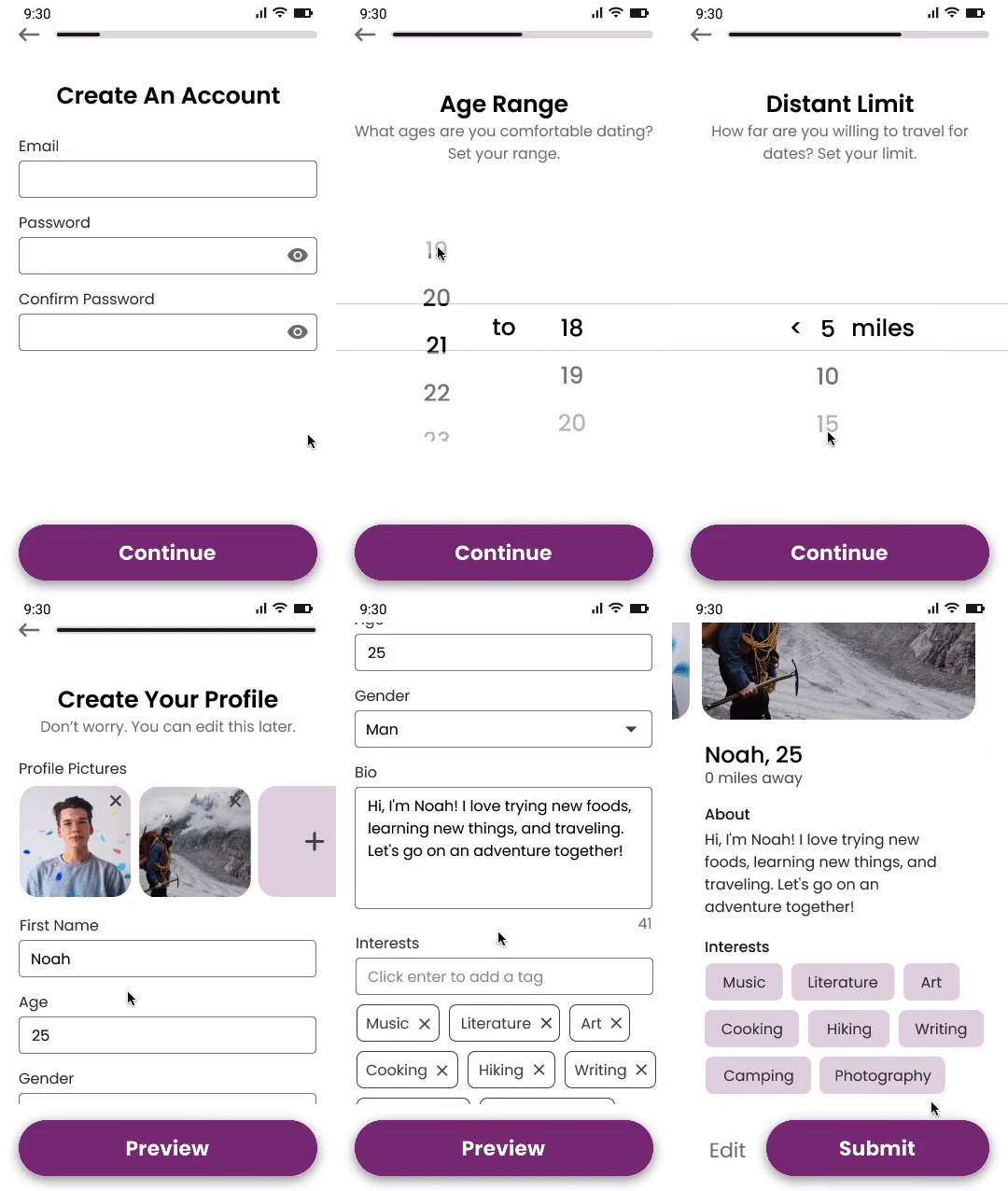
Onboarding Screens
Onboarding screens make it easy for users to sign up and start using the app right away. Initial user research revealed a desire for a dating app that focused on personality rather than visuals. To satisfy this need, I introduced interest tags. I also added a sexual orientation filter to help users find compatible partners who share similar feelings about sex.
User testing revealed the need for easier-to-understand text, so some content was reworded to provide more clarity. Instead of asking users about their sexual orientation, I changed it to sexual attitude, and I also relabeled “tags” to “interests”.
After the usability studies, the onboarding screens were improved with user-requested features. Users can now select up to six profile pictures and enter a 150-character bio. Other changes included adding a profile preview, number sliders, and password reveal button to improve usability.
User Experience #3: Login & Forget Password
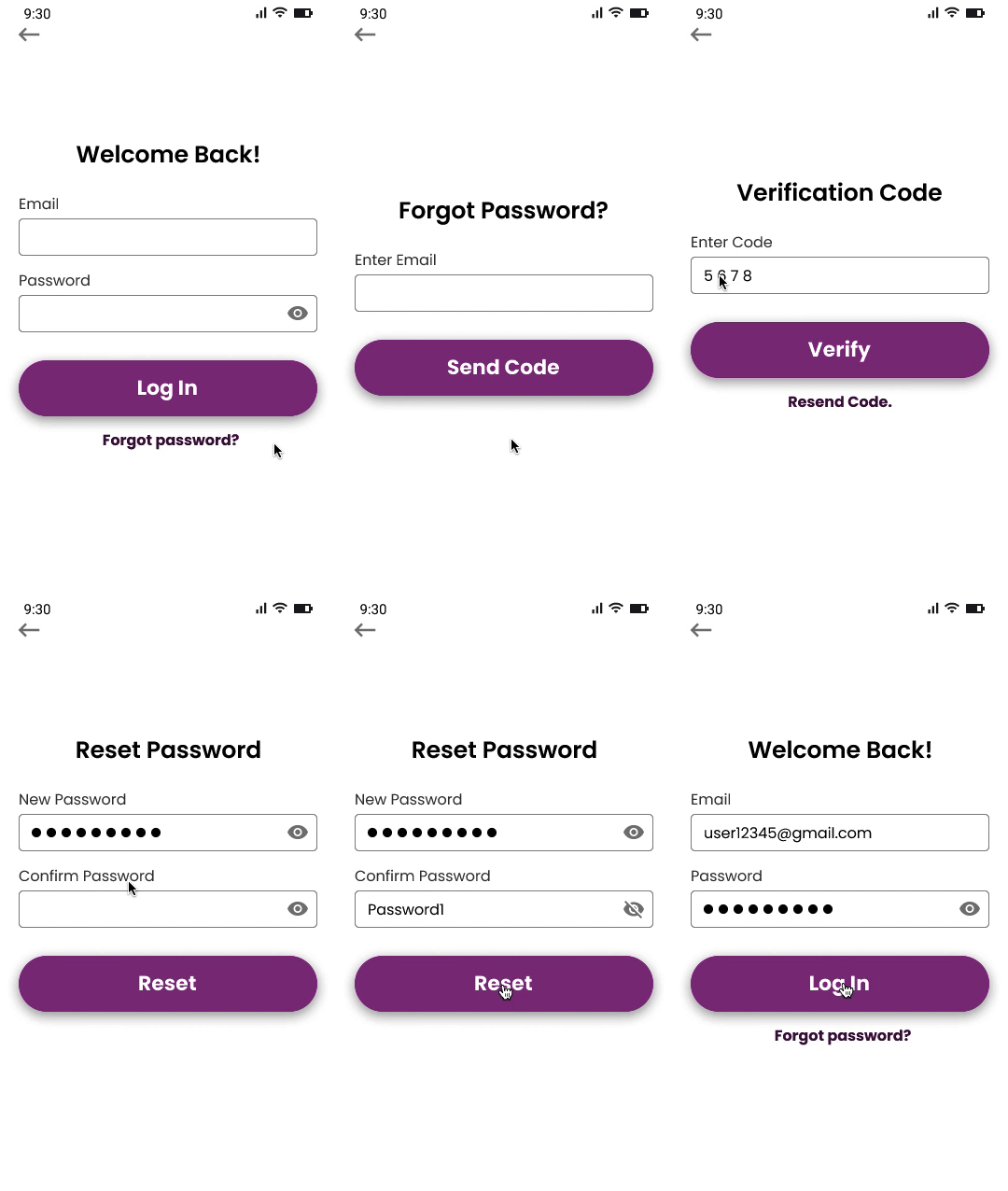
Login & Forget Password
The login and forget password screens make it easy for users to access their accounts securely.
User testing resulted in the addition of a password reveal button for improved security.
User Experience #4: Nearby & Expanded Profile

Nearby & Expanded Profile
The Nearby Screen functions as the home page, allowing users to view and interact with other profiles immediately after logging in. On this screen, cards display a profile preview of other people’s image and basic information. When opened, the expanded profile displays the complete profile.
The first usability study showed that users wanted more profile features, so “Skipping” and “Liking” buttons were added. Other design changes included giving navigation icons text labels for extra clarity, and replacing the tags on the profile cards with the user bio.
The second usability study revealed that users were unaware of the expanded profile view, so a tooltip was added to assist new users. Users also revealed the need for a reporting feature. This was added to the profile in the form of a drop-down menu to allow room for future features.
User Experience #5: Matches

Matches
The Match screen allows users to browse profiles and message their matches.
After the first usability study, I added an “Unmatch” button to the profile card, and “Unmatch” and “Message” buttons to the profile page for increased functionality. I also added a notification icon to indicate new matches.
Following the feedback from the second usability study, I added a “Report” button to the profile page.
User Experience #6: Messages & Chat
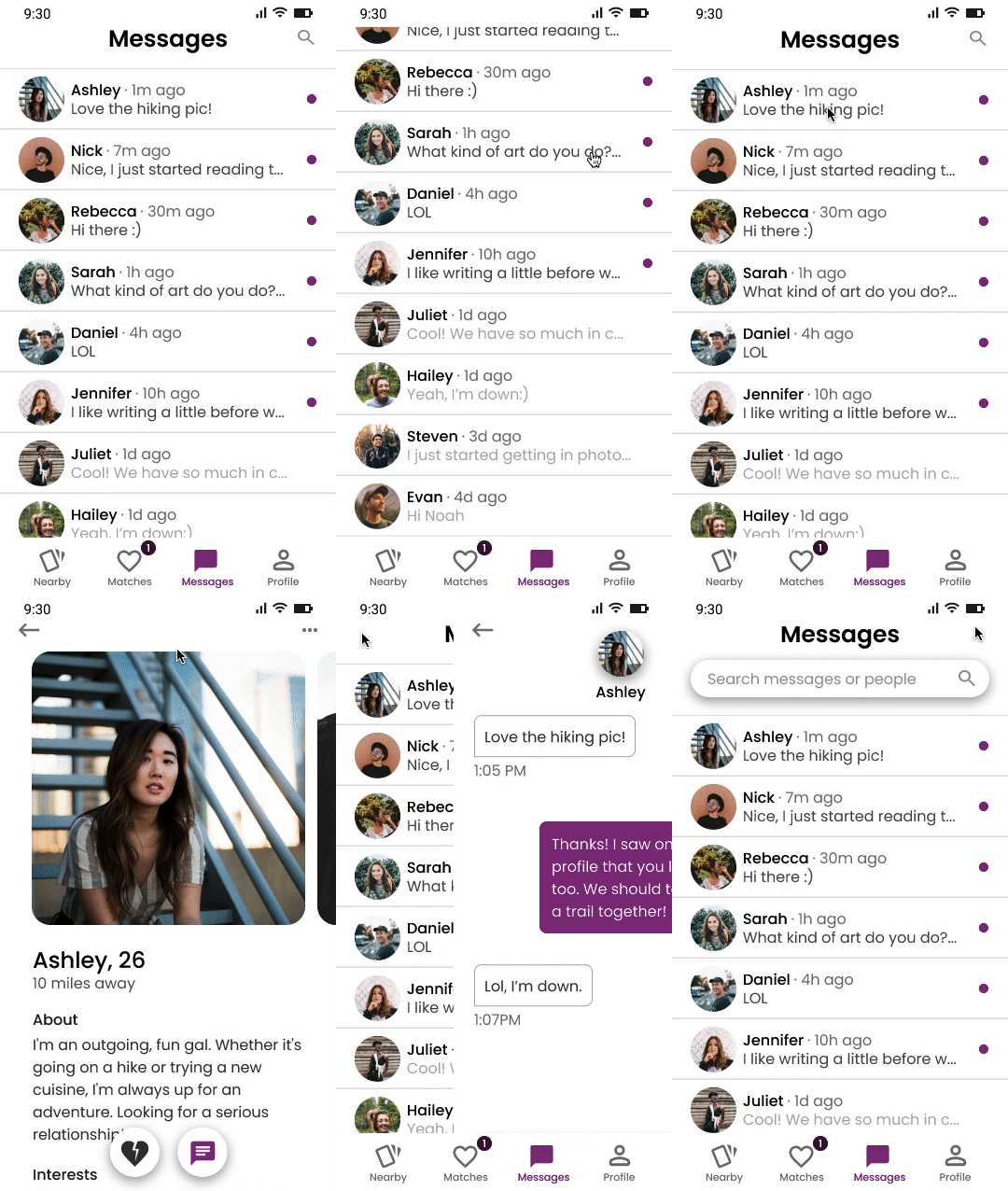
Messages & Chat
The Messages screen allows users to chat and build relationships.
After the first usability study, I added a notification icon on the navigation bar to inform users of new messages. A search bar was also added to improve navigation and help users quickly find messages or people.
Based on the findings from second usability study, I add a ‘Report’ button to the user profile in the Chat screen.
User Experience #7: Profile Menu

Profile Menu
The profile menu allows users to easily view and edit their profile, dating filters, or settings. In the digital wireframes, the profile menu was originally placed in the top navigation bar, right of the logo.
After the first usability study, I removed the logo and top navigation bar, as they were space-consuming and not essential. To make navigation simpler, I relocated the profile menu to the bottom navigation bar, replaced the menu icon with a profile icon, and added a label underneath. Other changes included adding icons to the profile menu pages, an edit button in the user profile, and a selection preview in the Dating Filters screen.
Style Guide
To create a consistent and enjoyable user experience, I developed a style guide using colors inspired by the Ace flag.
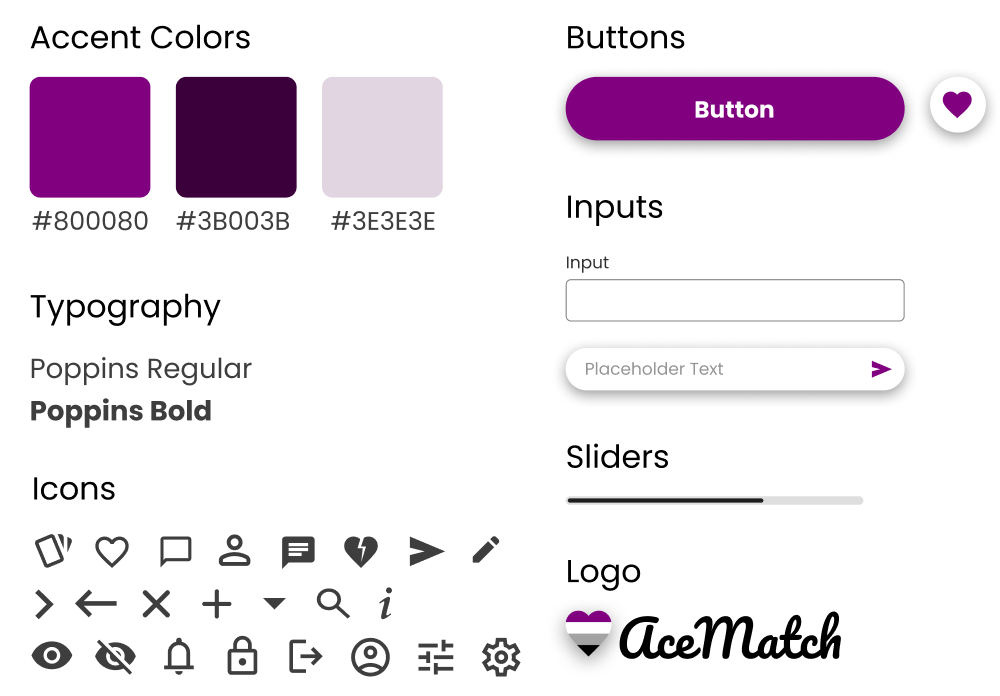
AceMatch style guide.
Reflection
The second usability study saw an improvement in its task completion rate, from 85% (as seen in the first study) to a 100% success rate for all participants. Additionally, I received no questions about the app’s functionality or the meaning of certain terms, indicating that the new design is user-friendly.
Working on this UX case study was a fantastic learning experience. At first, gathering user data and feedback seemed daunting, but I found that many people are willing to participate if you just ask.
Although this case study is now complete, I eventually want to code a working product to test with real users.