
frugalhomeaddict.com Redesign
Fostering Reader Trust Through Design
As the sole UX designer and front-end developer, I redesigned frugalhomeaddict.com in three months (March to May 2023), while pursuing my Google UX Design certificate. My responsibilities included research, design, prototyping, and implementation.
Overview
Frugal Home Addict is a two-year-old blog that covers various home-related topics. As the creator of the website and its content writer since 2021, I am personally committed to its redesign.
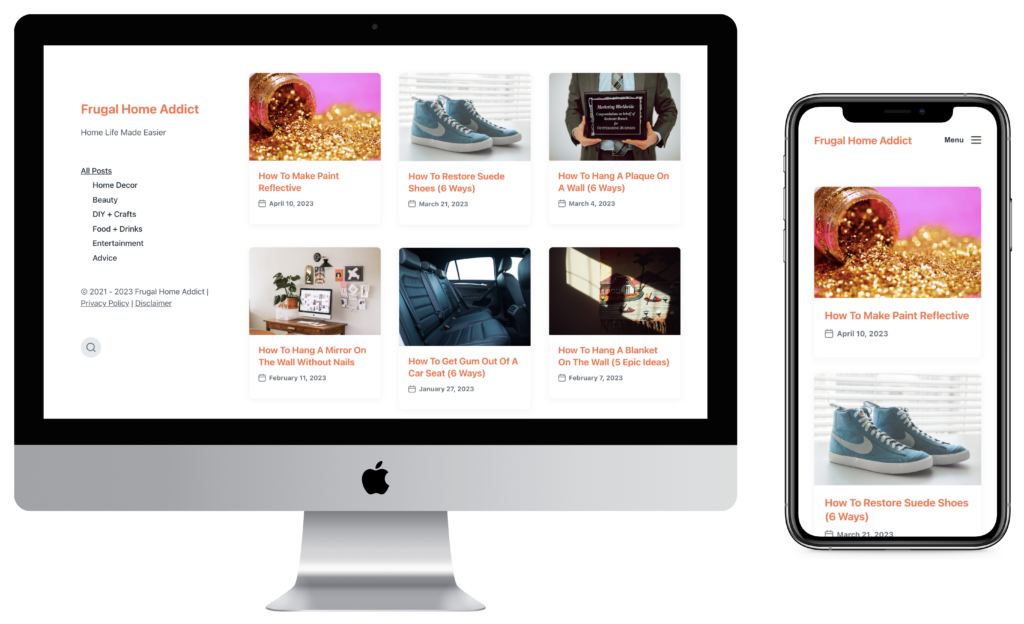
frugalhomeaddict.com Old Design
Problem
Frugal Home Addict uses a simple WordPress theme, lacks brand identity, and has disorganized categories. This case study aims to address these issues by improving its visual design and site map.
Usability Study – Old Website
I conducted a remote moderated usability study to identify reader pain points and gain feedback on the old site. During the study, I asked participants to complete a series of tasks and collected both quantitive and qualitative data.
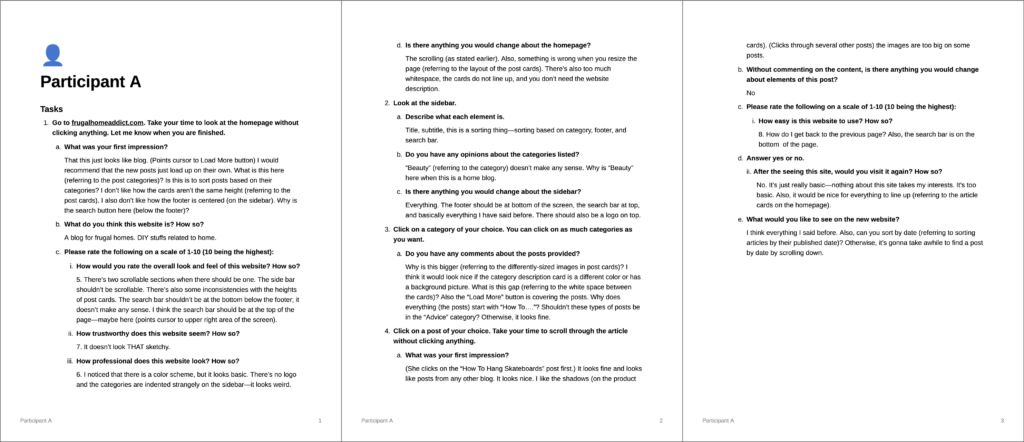
Interview Notes
Quantitive Data
I surveyed participants to assess their perception of Frugal Home Addict’s visual design, trustworthiness, professionalism, and ease of use. For quantitative analysis, I used Google Spreadsheets to generate charts based on the collected data.
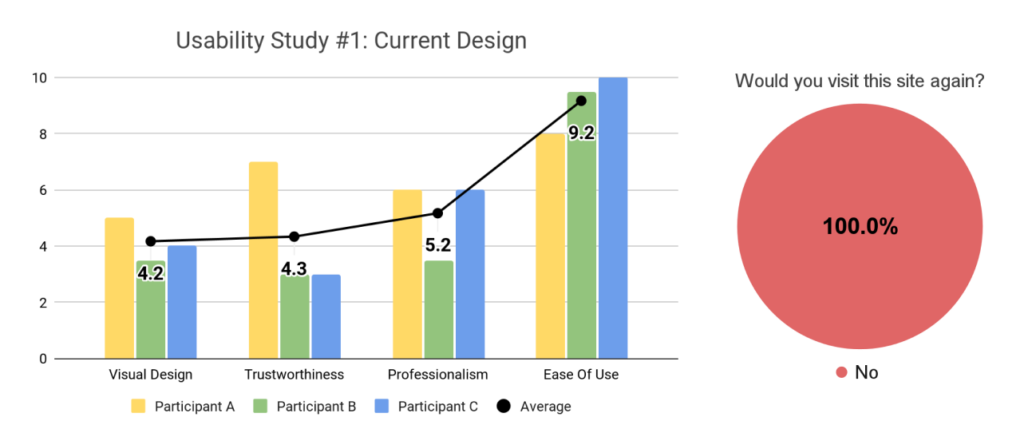
Quantitive Data
Although the site’s ease of use received an impressive average rating of 9.2, the visual design, trustworthiness, and professionalism scored lower at 4.2, 4.3, and 5.2 respectively. Unfortunately, none of the participants expressed a desire to revisit the site.
Qualitative Data
Using FigJam, I organized participants’ feedback into common themes within an affinity diagram. From there, I transformed these themes into actionable insights.
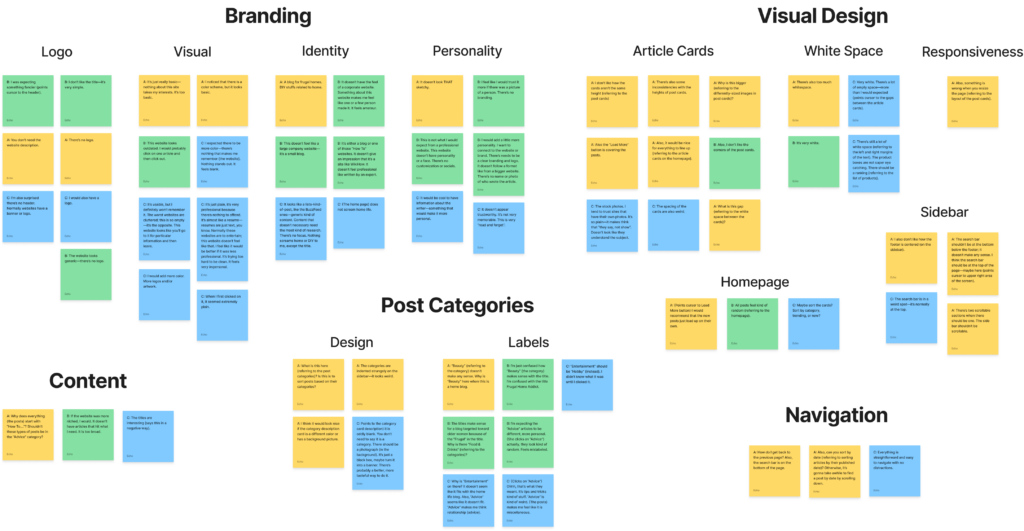
Affinity Diagram
Here’s what I learned:
Insight #1: Users find the current website design too basic and unmemorable, resulting in low return rates.
Insight #2: Users trust websites that have a strong brand identity and personality.
Insight #3: Users find that some post categories are too broad or unrelated to the overall theme of the website.
Insight #4: Users want a clear and organized post feed on the homepage to quickly access relevant content.
User Persona
Using the study insights, I created a detailed user persona to help tailor the new design to my main user’s needs and wants.

User Persona
Competitive Analysis
I conducted a competitive analysis to examine how direct competitors structure their site map and build credibility with readers.
For my analysis, I carefully selected authoritative website competitors—The Spruce, Better Homes & Gardens, and Real Simple. With millions of annual readers and multiple industry awards, this sites have established themselves as the leaders in the home niche.
Navigation
Examining the navigational headers of my competitors, I noticed that they have typically 7 to 9 main categories and an about page. By adding similar categories and pages, I can create an organized structure for Frugal Home Addict and establish trust with readers.

Navigational Headers From The Spruce, Better Homes & Gardens, And Real Simple
Establishing Trust
Analyzing competitors’ homepages, I found that they build credibility with new users through site statistics, author photos, mission statements, colors, and graphics.
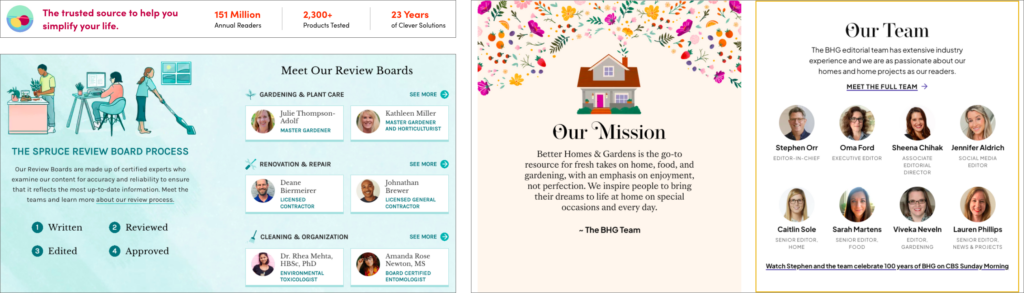
Various Components From The Spruce, Better Homes & Gardens, And Real Simple
Content Audit
The usability study revealed that some post categories were too broad or unrelated. To address this issue, I conducted a content inventory and created a pie chart to analyze the website’s current posts and categories.
Upon my analysis, I found that the Home Decor category constitutes 51% of all the posts. To improve content distribution, I will need to update the current categories by with more specific categories and subcategories.
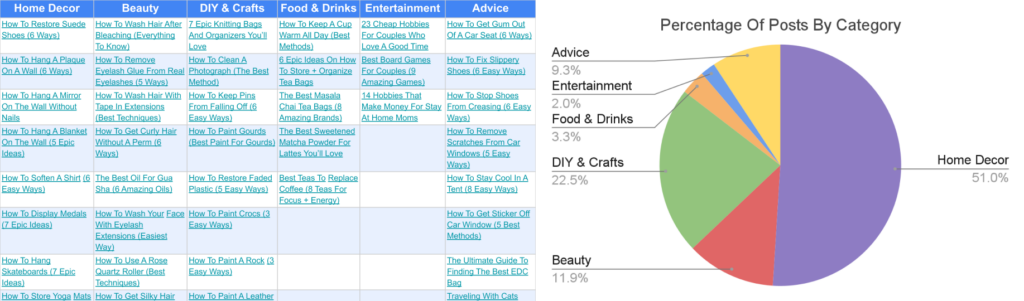
Content Inventory (Left), Content Distribution Chart (Right)
Using an affinity diagram, I grouped posts and created new categories and subcategories based on common themes. Insights from the competitive analysis also helped inspire new category ideas.
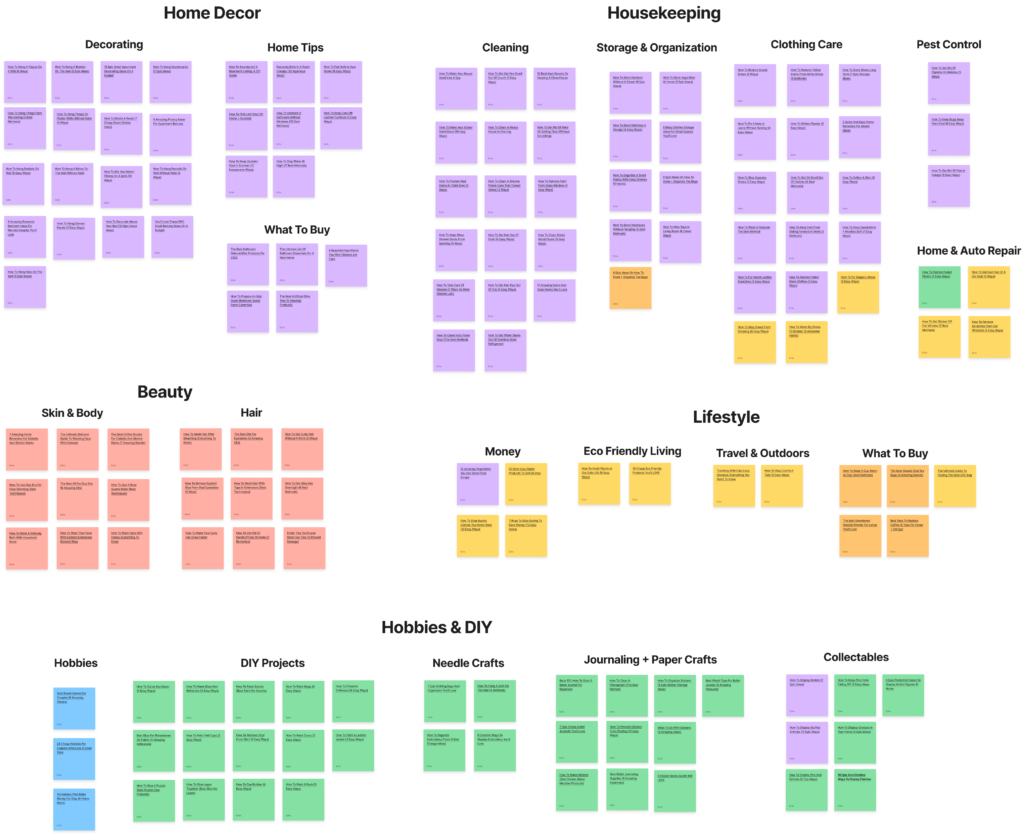
Affinity Diagram
Site Map Redesign
Using the updated categories from the content audit, I redesigned the site map for better navigation.
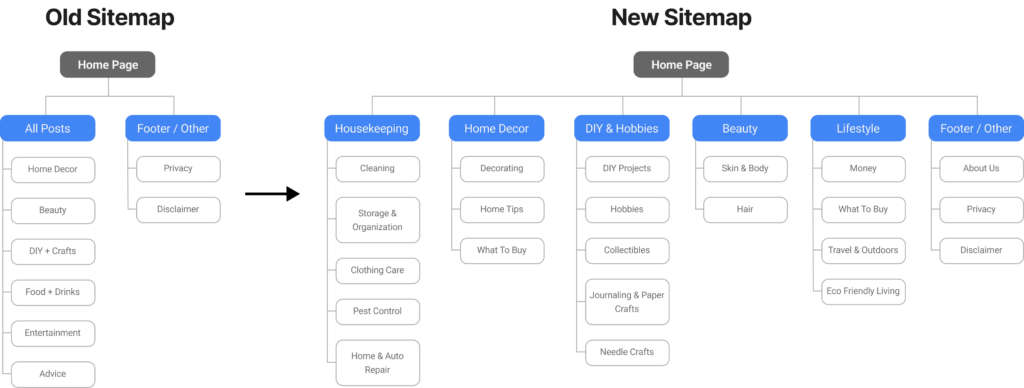
Site Map Redesign
Sketches & Digital Wireframes
Sketching allowed me to quickly generate multiple potential layouts for Frugal Home Addict.
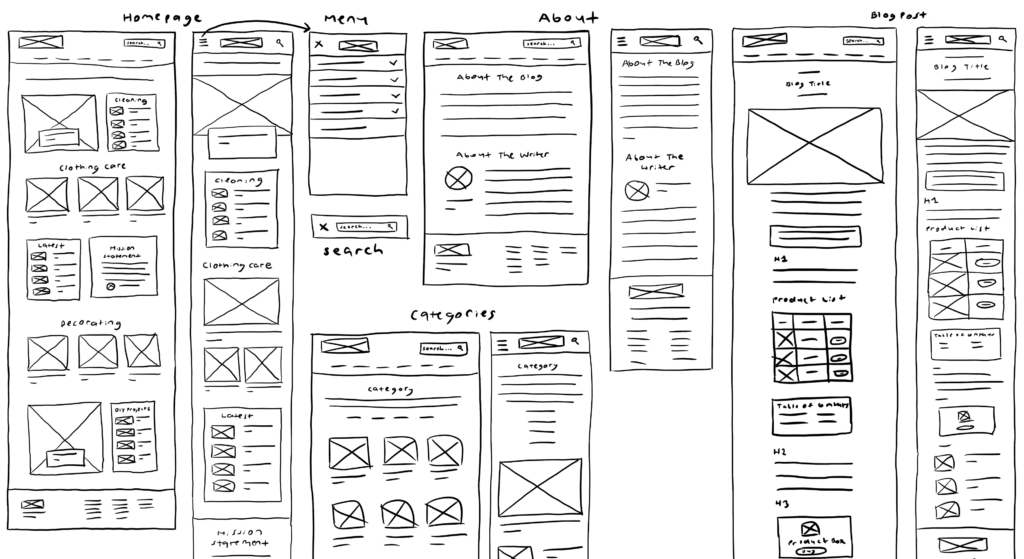
Final Sketches
Using the final sketches, I created digital wireframes with Adobe XD. This allowed me to easily iterate on the final layout design before working on the visual elements.
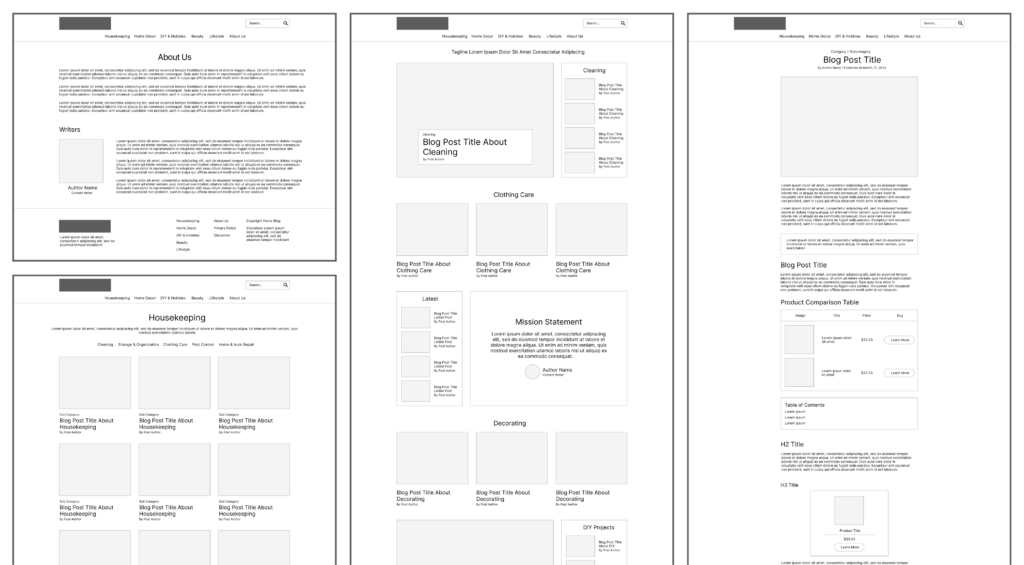
Desktop Digital Wireframes
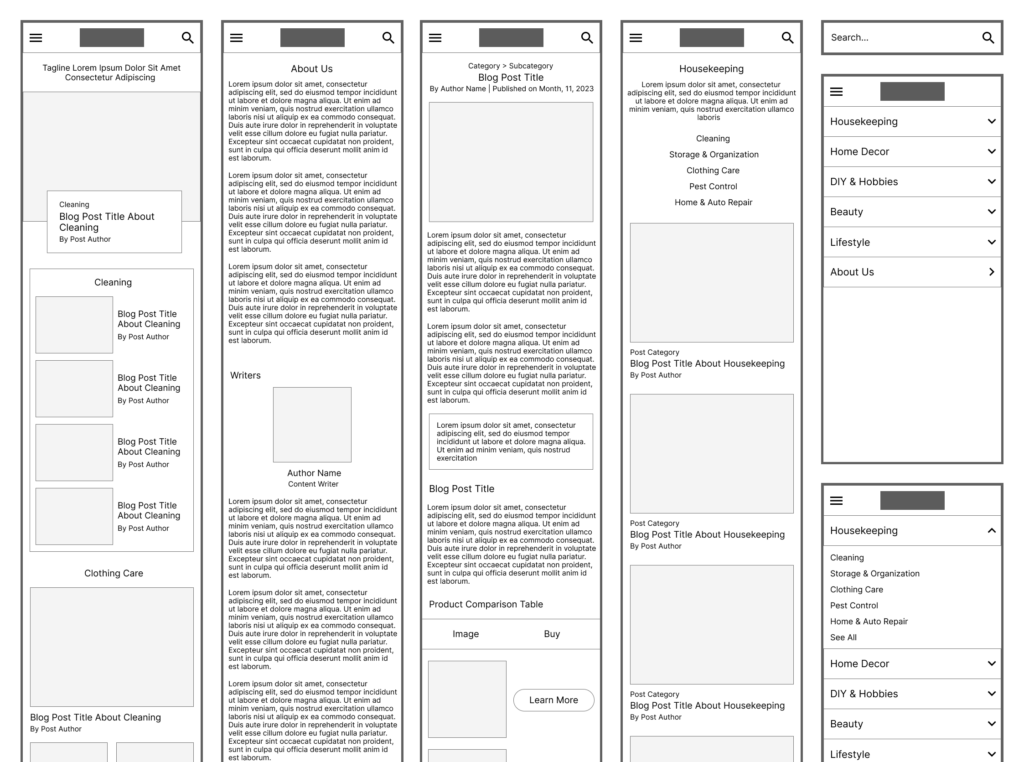
Mobile Digital Wireframes
MockUps & High Fidelity Prototype
Using the digital wireframes, I created mockups using Adobe XD. These mockups were then converted into a functional prototype for user testing and feedback.
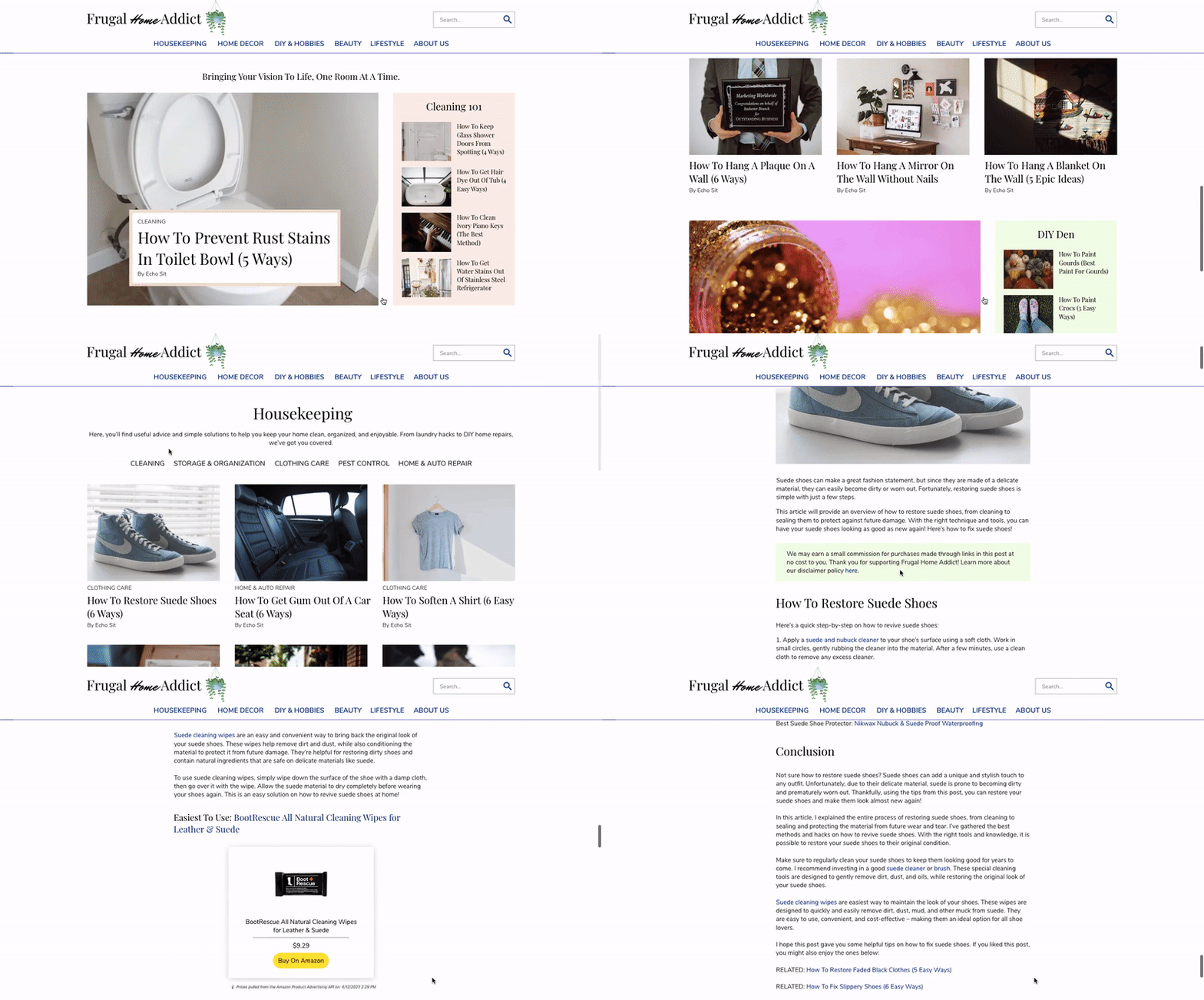
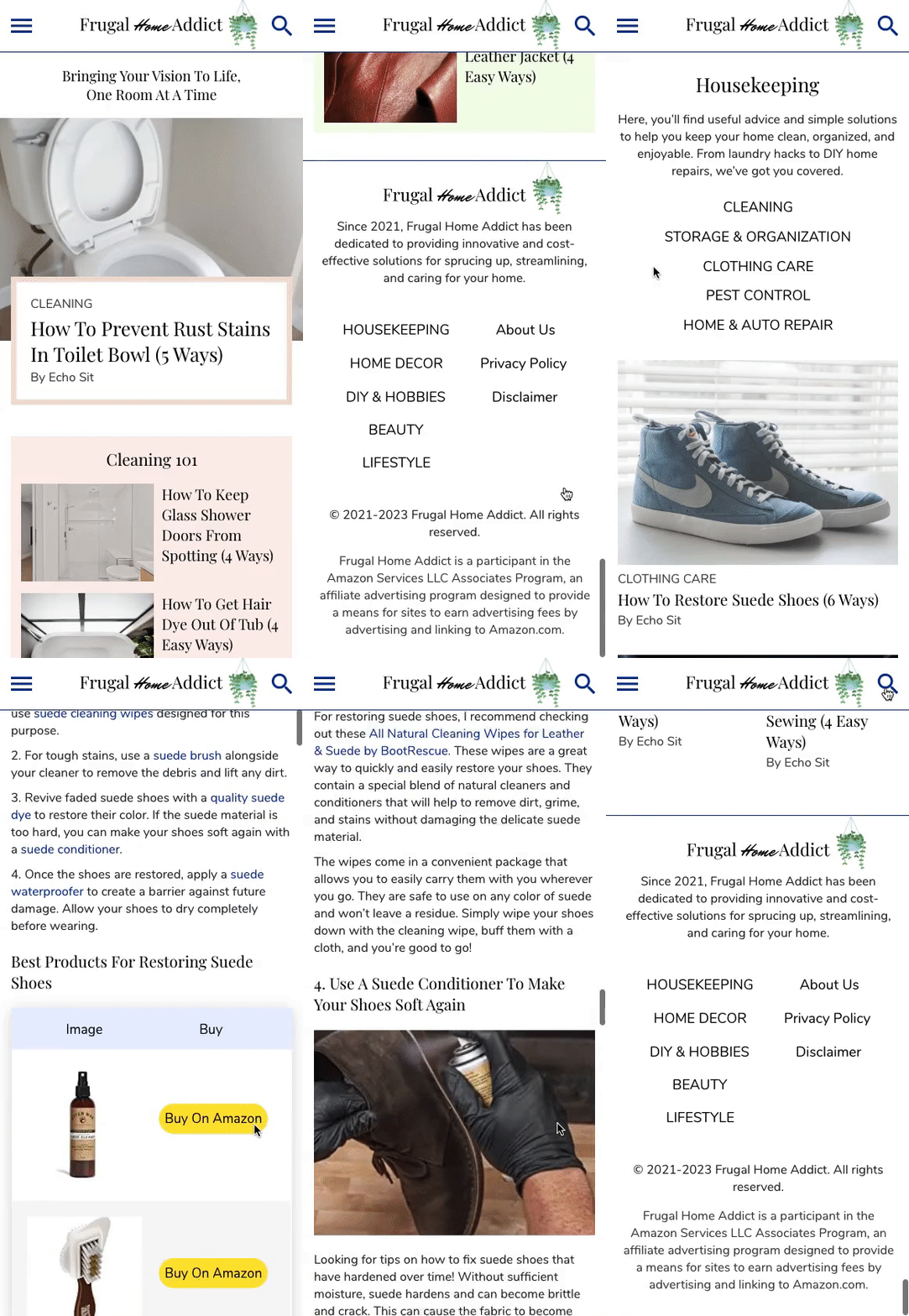
High Fidelity Prototype Tested In The 2nd Usability Study
2nd Usability Study – Website Redesign
I tested the high fidelity prototype in a second remote moderated usability study. This study aims to compare user rankings for visual design, trustworthiness, professionalism, and ease of use with the previous study, and identify further improvements for future iterations. Once again, participants completed tasks and I collected both quantitative and qualitative data.
Quantitive Results
To conduct quantitative analysis, I generated charts using Google Spreadsheets. The charts were based on the average user rankings from both the first and second usability studies.
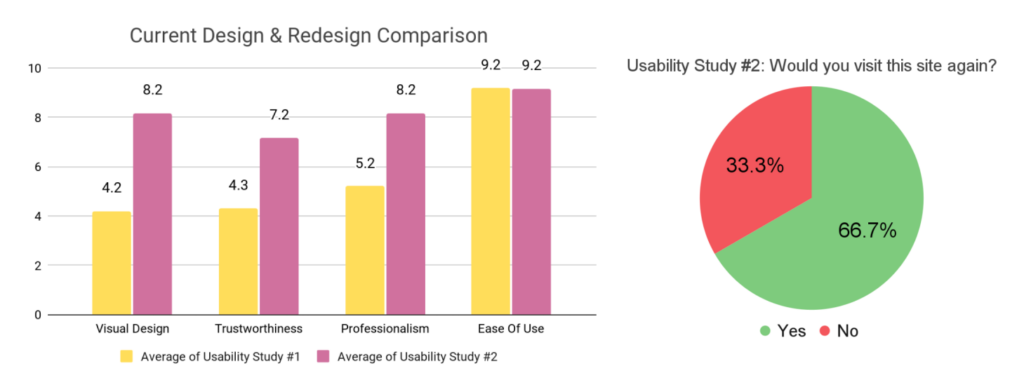
Quantitive Results
The results of the study showed significant improvements in visual design, trustworthiness, and professionalism, with scores increasing from 4.2 to 8.2, 4.3 to 7.2, and 5.2 to 8.2, respectively, while ease of use remained consistently high at 9.2.
Visual design showed a noteworthy 94% improvement, trustworthiness increased by 67%, and professionalism by 57%. The website redesign resulted in a remarkable increase in revisit interest, from 0% to 66.7%, indicating a significant improvement in user retention.
Qualitative Results
Once again, I used an affinity diagram to categorize participants’ feedback into common themes.
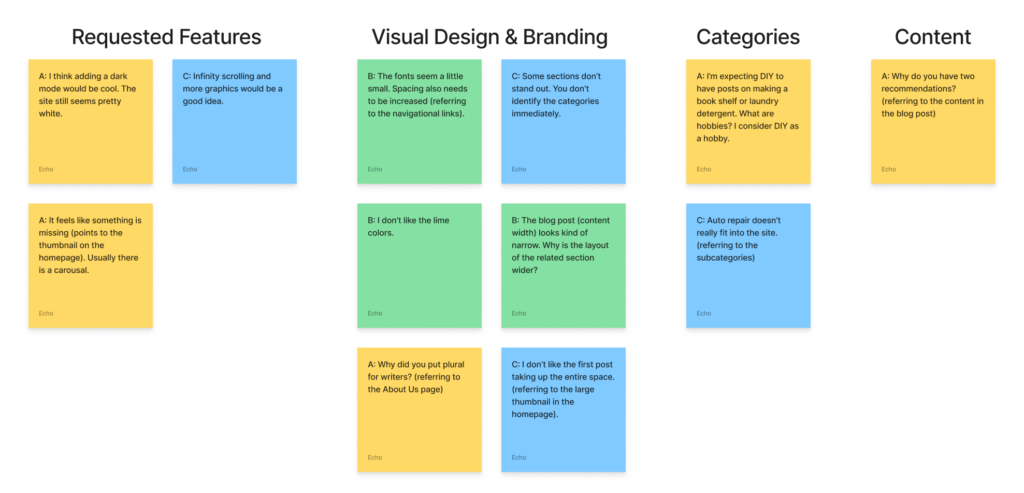
Affinity Diagram
Compared to the previous usability study, participants gave significantly less feedback. They provided minor criticism on the visual and layout design. Users also expressed that certain subcategories were not a good fit under their main categories. My recommendation for future iterations is to completely remove problematic posts/subcategories.
UX Redesign
Frugalhomeaddict.com was redesigned to improve its visual design, trustworthiness, and professionalism, after receiving poor rankings in the initial usability study.
The study revealed the old site design was basic and forgettable, leading to low return rates. To enhance brand appeal and increase user loyalty, I utilized fun fonts, vibrant colors, engaging copy, and colorful graphics.
User Experience #1: Home Page
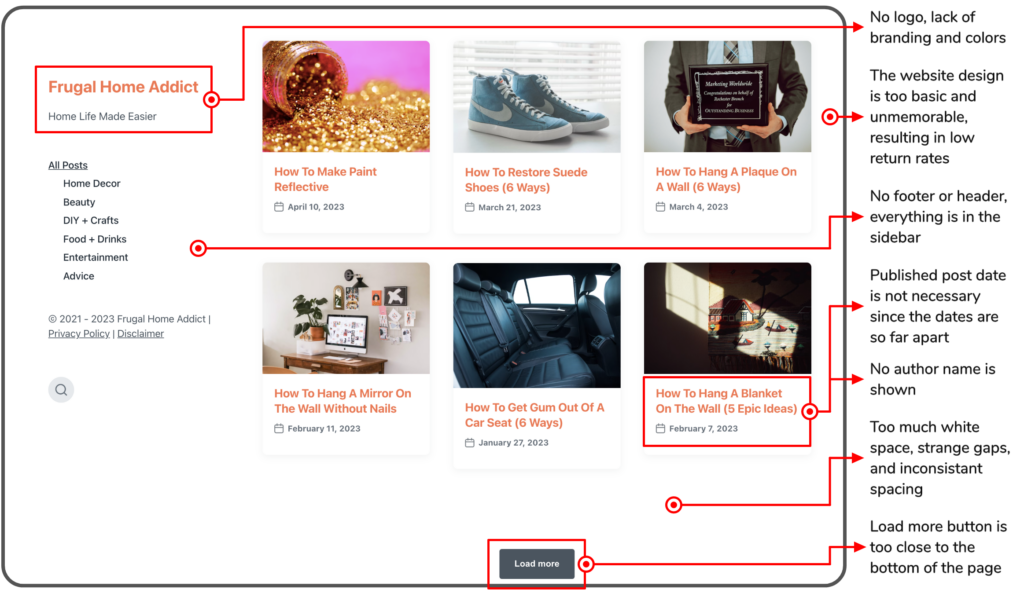
Old Home Page
Redesigned Home Page
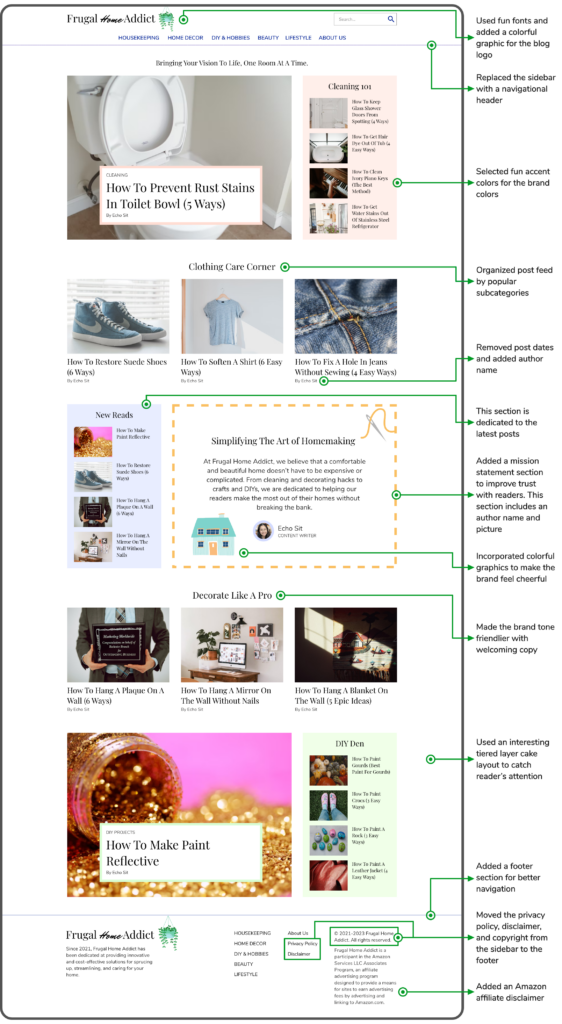
The home page showcases the site’s content, establishes brand identity, and builds trust with new users. For the redesign, I included a new layout and branding elements influenced by the competitive analysis.
According to the first usability study, users want a clear and organized post feed on the home page. To ensure quick access to meaningful content, I reorganized the home page by relevant subcategories. I also added a mission statement section, inspired by competitors, to enhance reader trust.
Other changes include eliminating post dates (as the first usability study revealed them to be unnecessary), adding the author name to enhance credibility, and resizing thumbnails to have uniform dimensions.
User Experience #2: Menu
Old Menu (left); Redesigned Menu (right)
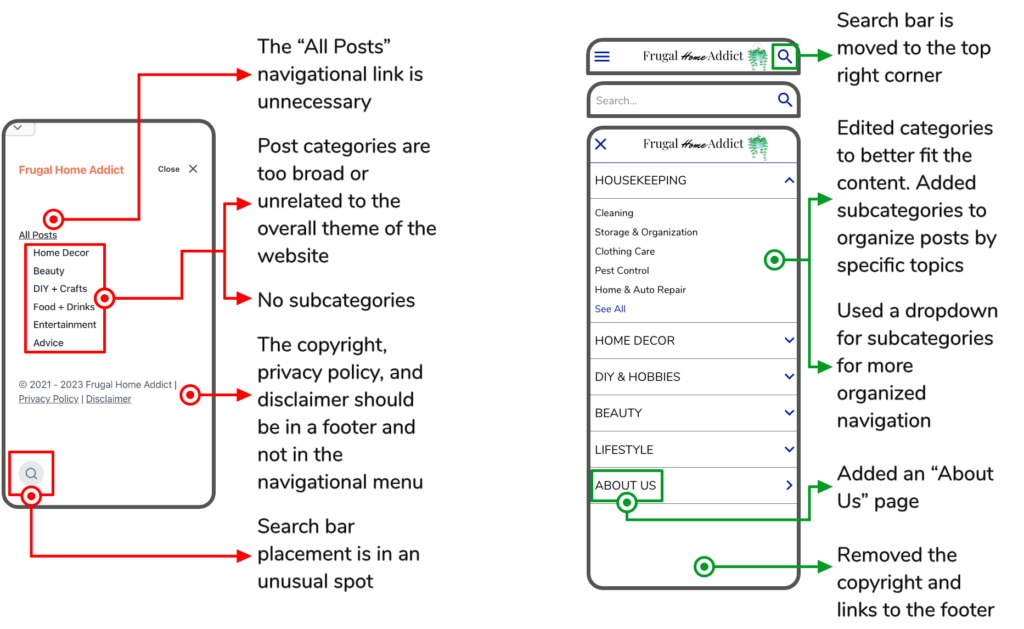
The menu helps users locate significant pages and filter posts by category.
In the redesign, I eliminated the sidebar and replaced it with a header and footer. Additionally, I improved navigation placement by moving the search bar to the top right corner and the copyright, disclaimer, and privacy policy to the footer.
The first usability study revealed that the original categories are too broad or unrelated. As a result, I edited the categories to better fit the content and added subcategories to organize posts by specific topics. For cleaner navigation, I used a dropdown menu to display subcategories under the main categories.
User Experience #3: About Page
About Page
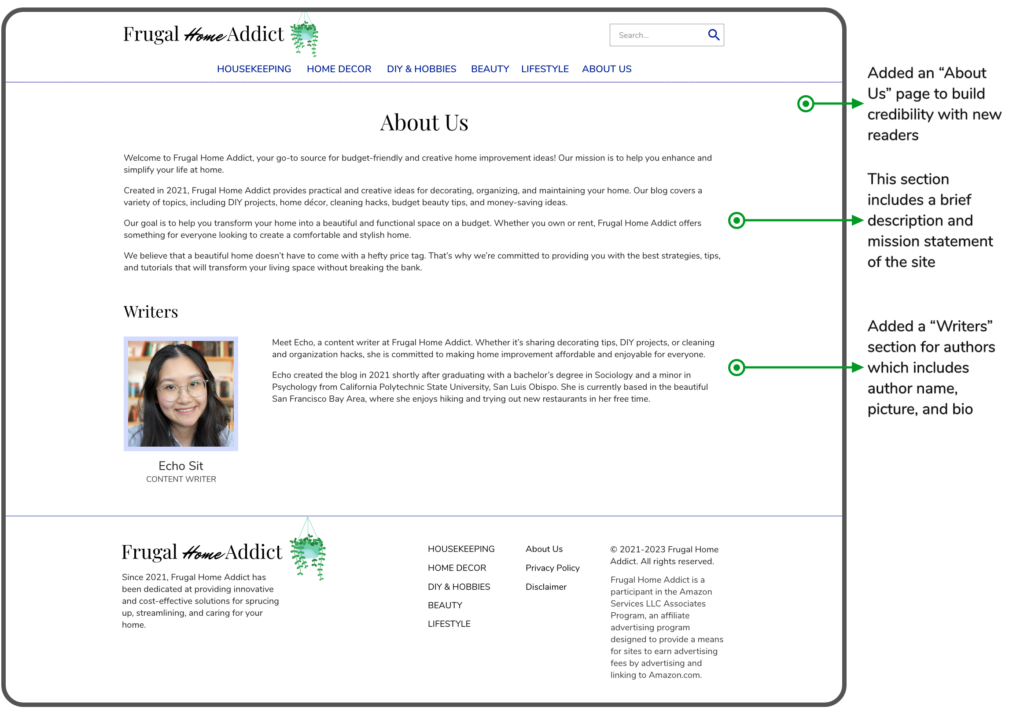
Following the competitive analysis, I added an about page to build credibility with readers by outlining the brand’s history and mission. This page also features a section dedicated to the writers, showcasing their backgrounds, experience, and expertise.
User Experience #4: Category Page

Old Category Page

Redesigned Category Page
By categorizing posts, this page simplifies navigation and allows visitors to easily locate posts by topic. For the redesign, I added a subcategory section to let readers easily sort content by specific topics.
After the initial usability study, I added the category and author name to the post thumbnails, removed dates, and resized images evenly. Other minor visual changes include updating the category page to display up to 9 posts per page and replacing the “Load more” button with a pagination.
User Experience #5: Blog Post
Old Blog Post
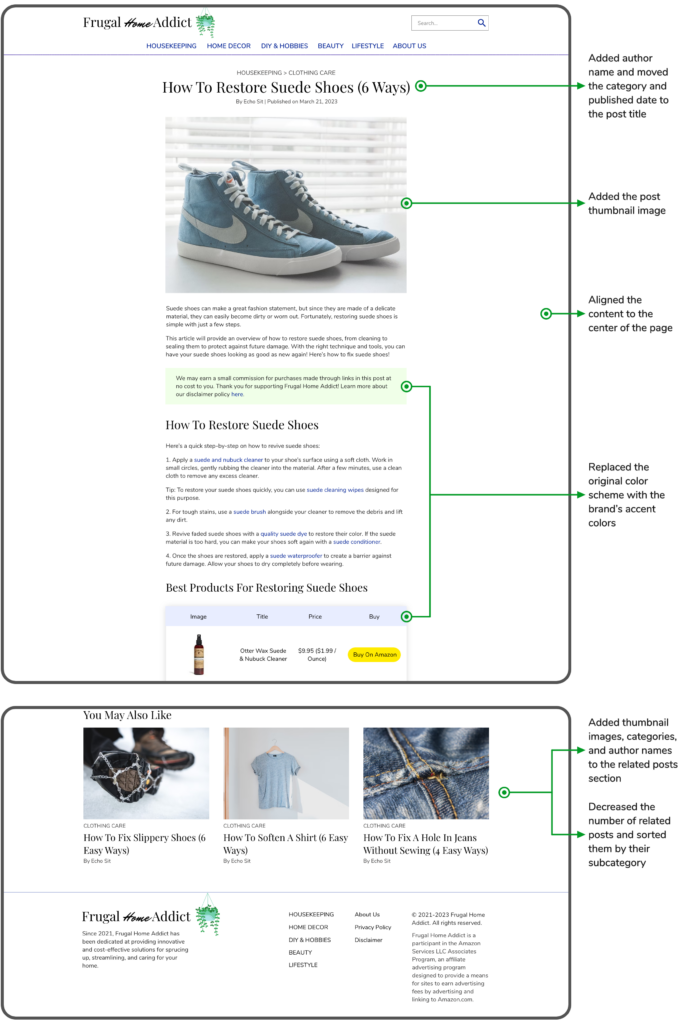
Redesigned Blog Post
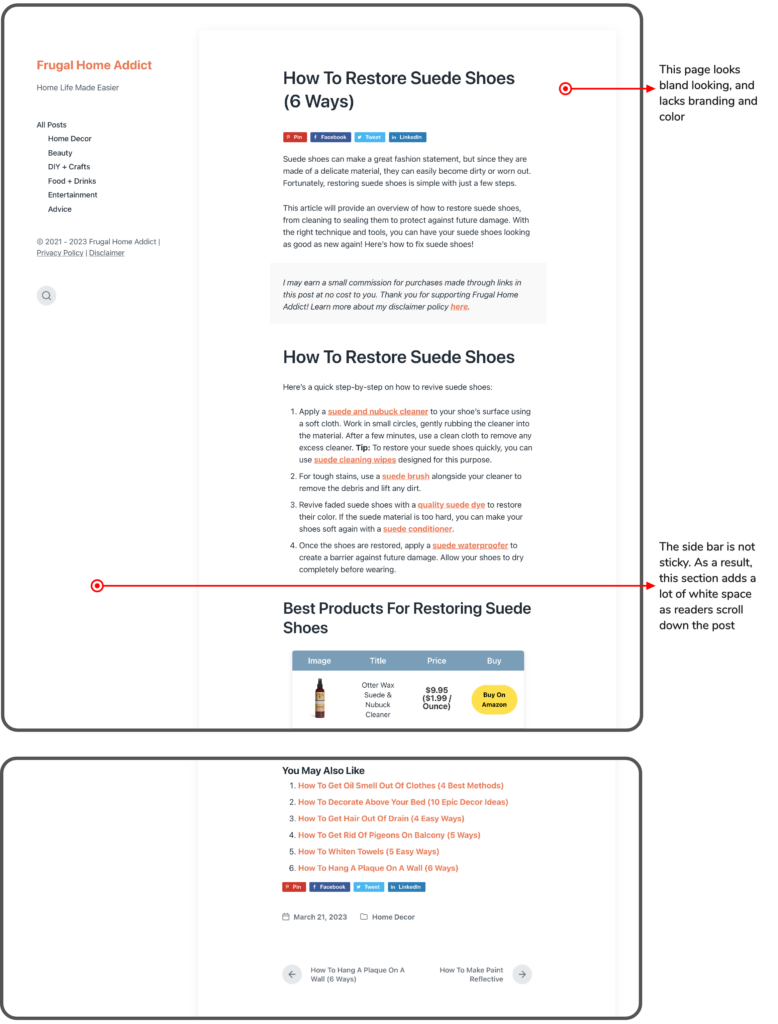
As Frugal Home Addict’s traffic is primarily organic, the blog post is often the first point of entry for new readers. Therefore, it is crucial to make a favorable first impression.
The blog post design underwent minor modifications. To enhance trust and improve navigation, I placed the author name, category, and publication date next to the post title. Other design changes include adding a thumbnail image, centering the content, and replacing the original color scheme with the brand’s accent colors.
In addition, I improved the related post section by adding thumbnail images, categories, and the author name. I also decreased the number of related posts and sorted them by relevant subcategories.
Style Guide
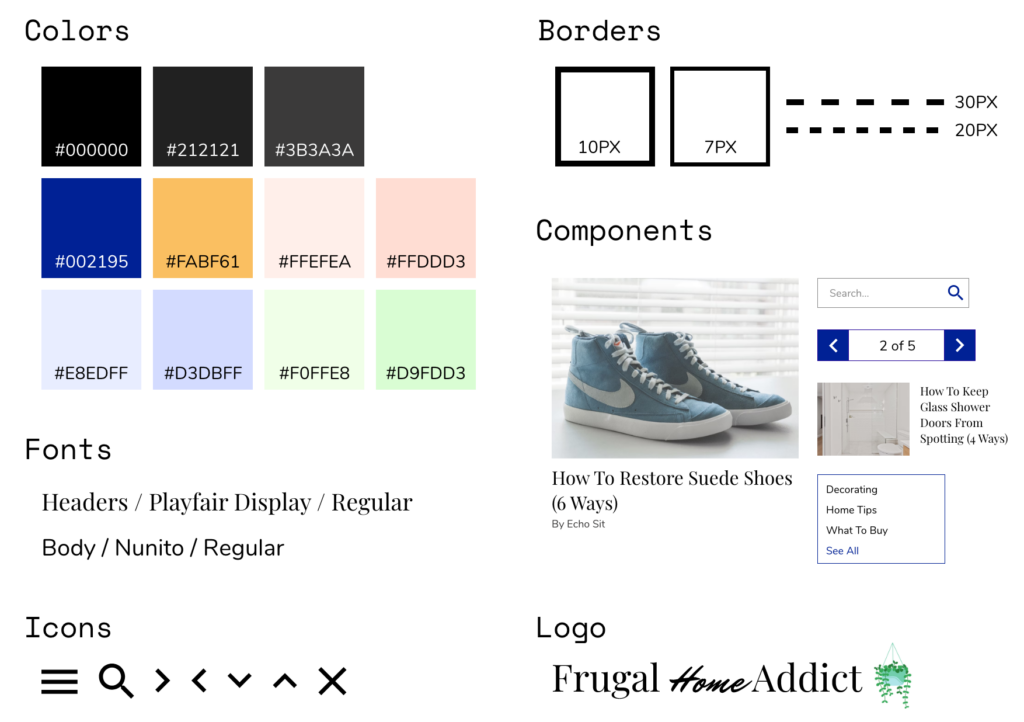
I developed a style guide to ensure consistent branding and design across Frugal Home Addict’s digital platforms. This included using lively accent colors and playful fonts to create a cheerful atmosphere.
Style Guide
Coding & Implementation
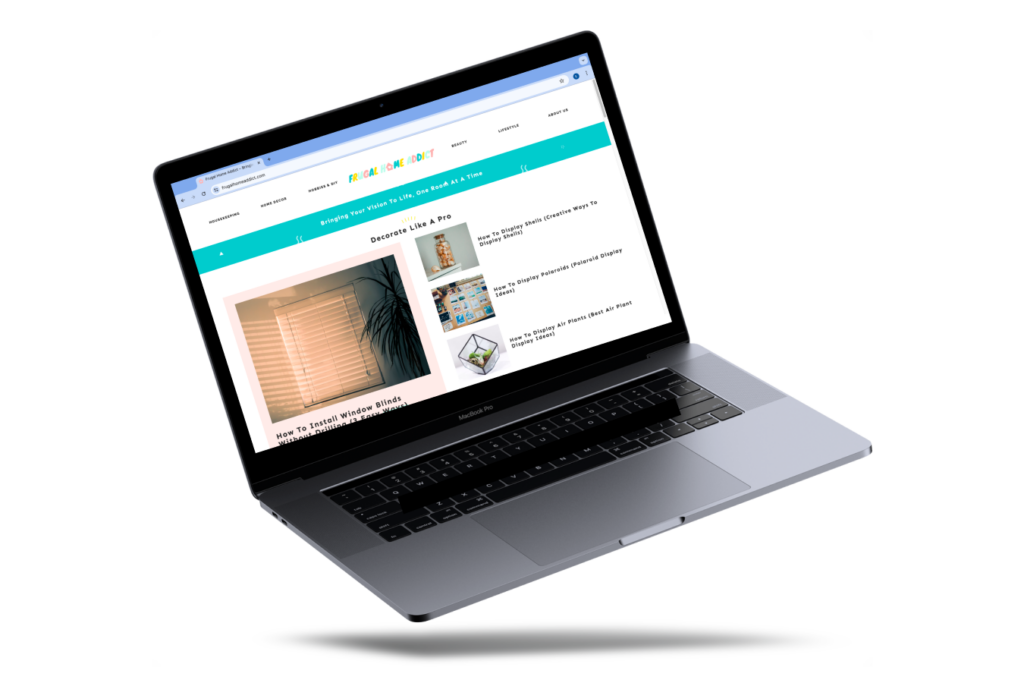
Although my intention was to code and implement the redesign to create a WordPress theme using PHP, I found the language more challenging than anticipated. Instead of coding from scratch, I bought a theme and customized it to match the original redesign layout.
I decided to retain the theme’s default branding colors and logo, as I found them appealing. I added an “About” page to provide more information about the site, similar to the redesign. Additionally, I edited the categories using the updated site map but also combined some similar subcategories for better organization and user experience.
Conclusion
The second usability study confirmed the redesign was a success. Visual design saw a remarkable improvement of 94%, while trustworthiness and professionalism increased by 67% and 57%, respectively. Additionally, the website redesign resulted in a significant increase in revisit interest, from 0% to 66.7%. Participants also gave less feedback, indicating a more efficient and enjoyable experience.
In this case study, I used AdobeXD for the first time. Unfortunately, I faced issues with the Document Assets feature. As I added more colors and components, the program became too slow to use. To avoid similar problems in future projects, I plan to switch back to using Figma. Additionally, based on the results of the second usability study, my next steps for the redesign is to completely remove problematic posts/subcategories.